
WisBean5.36.0 - App Store
You'll be able to see results in few seconds.
Publisher Description


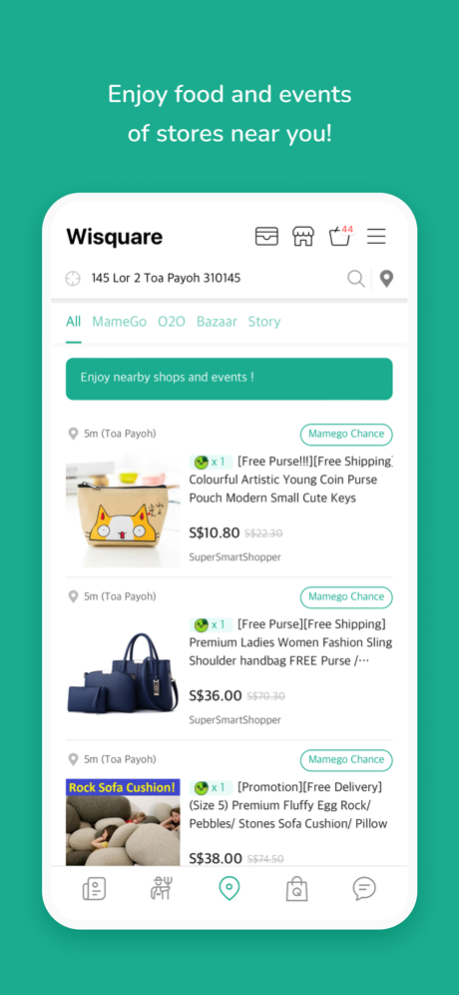
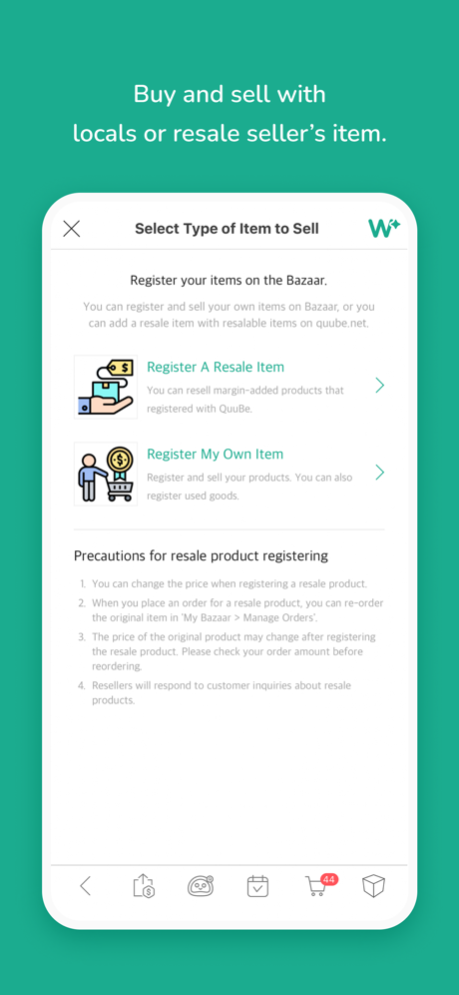
Live10 is reborn as WisBean!
Main service
- Following shop news: Check out new discount news from your following shop that you buy frequently!
- Location-based services: you can order food from nearby restaurants through the app or trade second-hand goods and get store events
- WisFarm Service: The WisFarm service provided by Qoo10 is also available in WisBean.
- QShopping Service: You can also order a variety of Qoo10 items from WisBean.
We will inform you about the app access permission required for WisBean service.
[Essential access rights]
- Device and app records: Check app errors, optimize services, and improve the usability
[Optional access rights]
- Notifications: app notifications
- Camera/Album: Taking and attaching photos or videos when making inquiries or writing reviews, QR code recognition
- Microphone / Voice Recognition: Voice Search
- Location: Search based on user location
- Biometric authentication information: log in and payment
* Optional access rights require consent when using related functions, and even if you do not agree, you can use services other than those functions.
* You can change the optional access permission settings in the mobile phone "Settings > WisBean".
* Optional access rights items may be different for each model.
Jun 13, 2024
Version 5.36.0
1. Q&A menu added in Chatting.
2. Following brand shop is added in WisNews(Main)
3. Login UI improved & Bug Fixed
About WisBean
The company that develops WisBean is Qoo10 Pte Ltd. The latest version released by its developer is 5.36.0.
To install WisBean on your iOS device, just click the green Continue To App button above to start the installation process. The app is listed on our website since 2024-06-13 and was downloaded 0 times. We have already checked if the download link is safe, however for your own protection we recommend that you scan the downloaded app with your antivirus. Your antivirus may detect the WisBean as malware if the download link is broken.
How to install WisBean on your iOS device:
- Click on the Continue To App button on our website. This will redirect you to the App Store.
- Once the WisBean is shown in the iTunes listing of your iOS device, you can start its download and installation. Tap on the GET button to the right of the app to start downloading it.
- If you are not logged-in the iOS appstore app, you'll be prompted for your your Apple ID and/or password.
- After WisBean is downloaded, you'll see an INSTALL button to the right. Tap on it to start the actual installation of the iOS app.
- Once installation is finished you can tap on the OPEN button to start it. Its icon will also be added to your device home screen.
Program Details
System requirements
Download information
Pricing
Version History
version 5.36.0
posted on 2024-06-13
Jun 13, 2024
Version 5.36.0
1. Q&A menu added in Chatting.
2. Following brand shop is added in WisNews(Main)
3. Login UI improved & Bug Fixed
version 5.35.0
posted on 2023-12-08
Dec 8, 2023
Version 5.35.0
1. Q&A menu added in Chatting.
2. Following brand shop is added in WisNews(Main)
3. Login UI improved & Bug Fixed
version 5.34.0
posted on 2023-05-19
May 19, 2023
Version 5.34.0
1. Q&A menu added in Chatting.
2. Following brand shop is added in WisNews(Main)
3. Login UI improved & Bug Fixed
version 5.33.0
posted on 2023-03-13
Mar 13, 2023
Version 5.33.0
1. Q&A menu added in Chatting.
2. Following brand shop is added in WisNews(Main)
3. Login UI improved & Bug Fixed
version 5.30.0
posted on 2022-07-11
Jul 11, 2022 Version 5.30.0
Bug fix
version 5.29.0
posted on 2022-01-14
Jan 14, 2022 Version 5.29.0
Qbox renewal
- This page has been renewed.
- Q*Coin wallet has been added, so you can check your balance.
Contact Import UI/UX Improvements
- Improved action and UI for importing contacts.
Add Profile Quick Menu to Chat
- When you tap the other person's profile in the chat room, you can make a call, move the booth, add a friend, etc. from the quick menu.
version 5.28.0
posted on 2021-11-09
Nov 9, 2021 Version 5.28.0
Login
- You can select a site to access when logging in with the Live10 app.
- If your account was disabled at login, go to the next step to enable it.
Contacts
- You can add up to 3 phone numbers to 1 contact.
LiveCast
- If you are a live broadcast host, you can pin messages sent by viewers to chat.
version 5.27.2
posted on 2021-09-30
Sep 30, 2021 Version 5.27.2
Meet the newly transformed Live10.
1) Reorganization of the Livecast broadcasting screen
2) Add a function to expose the broadcast banner to Live10 main.
3) Add Message Reply feature to chat room
4) Improvements to the Address Book tab UI
- Add Index Table
- Add QFriends Only View Filter
5) Add in-app update notification feature
7) Reorganizing of the main setting screen
version 5.27.1
posted on 2021-08-13
Aug 13, 2021 Version 5.27.1
Meet the newly transformed Live10.
1) Reorganization of the Livecast broadcasting screen
2) Add a function to expose the broadcast banner to Live10 main.
3) Add Message Reply feature to chat room
4) Improvements to the Address Book tab UI
- Add Index Table
- Add QFriends Only View Filter
5) Add in-app update notification feature
7) Reorganizing of the main setting screen
version 5.26.1
posted on 2021-06-22
Jun 22, 2021 Version 5.26.1
Meet the New Live10
1) Improving broadcasting environment and UI
- Add test-mode that can pre-check the broadcast status
- Multiple rounds Quiz Support
- Displayed live floating banners on the main screen of Live10
2) Added survey function to mini shop and group chat room
3) Remove User Mode Transition Policy
4) Improve the way messages are read all
5) Add Sub tab Circulation Behavior
6) Add chat room Font Size Adjustment to App Settings
Disclaimer
Official App Store Link
We do not host WisBean on our servers. We did not scan it for viruses, adware, spyware or other type of malware. This app is hosted by Apple and passed their terms and conditions to be listed there. We recommend caution when installing it.
The App Store link for WisBean is provided to you by apps112.com without any warranties, representations or guarantees of any kind, so access it at your own risk.
If you have questions regarding this particular app contact the publisher directly. For questions about the functionalities of apps112.com contact us.
